

Most people think prompting AI is a technical skill.
They imagine that the best results come from secret commands, clever wording, or knowing exactly which model to use for each task. That may help, but it misses the bigger lesson.
AI is not only teaching people how to prompt. It is teaching them how to brief, manage, explain, evaluate, and lead.
Every weak prompt exposes the same problem as a weak project brief. Every vague instruction produces the same kind of disappointing output you would get from a designer, developer, or junior team member who was given unclear direction.
The difference is speed.
When a human receives a bad brief, the consequences may appear days or weeks later. When AI receives a bad prompt, the consequences appear almost instantly.
That makes AI one of the fastest feedback loops ever created for improving communication.
The Real Lesson Is Not About AI
Teams that use AI heavily begin to notice a pattern.
Some people consistently receive useful, polished, and practical results. Others receive generic interfaces, shallow copy, basic layouts, or answers that technically follow the instruction but completely miss the intent.
The difference is rarely intelligence or technical ability.
The difference is specificity.
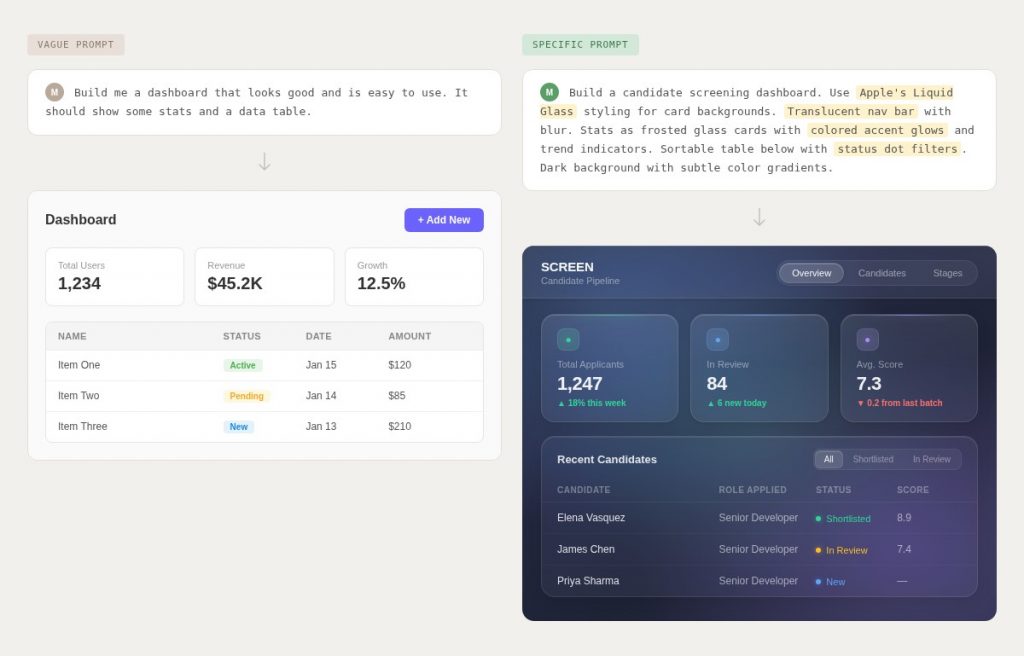
A prompt such as “make this look good” usually produces the same predictable result: something average, safe, and generic.
A better prompt gives the model context, references, constraints, examples, and a clear target.
Instead of saying:
“Build a nice dashboard.”
A stronger brief might say:
“Build a SaaS analytics dashboard for a hiring tool. Use a clean glass-style interface, soft gradients, rounded cards, a left navigation area, three KPI cards at the top, a candidate pipeline chart, and a sortable table. The design should feel premium, calm, and modern rather than playful.”
That second instruction gives direction. It reduces guesswork. It gives the model a box to work inside.
The same principle applies to people.
A designer cannot reliably interpret “modern.” A developer cannot accurately scope “simple.” A copywriter cannot confidently write “professional” unless you explain what that means in the context of the project.
AI simply makes the weakness of those words impossible to ignore.

Vague Instructions Create Generic Work
Bad briefs usually feel clear to the person giving them.
That is why they are so dangerous.
A founder may say, “I want the website to feel premium.”
A client may say, “Make the homepage more exciting.”
A manager may say, “Improve the onboarding flow.”
A marketer may say, “Write something more engaging.”
Each of those instructions sounds reasonable. But none of them tells the person doing the work what success looks like.
Premium compared to what?
Exciting for which audience?
Improved according to which metric?
Engaging in what tone?
Without those answers, the person receiving the brief has to guess.
AI guesses too.
It fills the empty space with patterns it has seen before. That is why vague prompts often produce work that looks familiar, polished, and forgettable.
The output may not be broken. It may even be acceptable. But it rarely feels intentional.
That is the key distinction.
Good work usually comes from clear intent. Generic work usually comes from unclear direction.
Why This Matters for WordPress Professionals
This lesson is especially important for WordPress freelancers, agencies, product builders, and consultants.
AI is making execution cheaper.
A client can now ask a tool to generate landing pages, write code snippets, produce copy, create wireframes, suggest SEO titles, or build small internal tools. The output may not always be perfect, but it is often good enough to make low-level execution feel less valuable than it used to.
That does not mean WordPress professionals are becoming irrelevant.
It means the value is moving.
The premium is no longer simply in being able to build. The premium is in knowing what should be built, why it should be built, how it should be scoped, and when the client is asking for the wrong solution.
A client may ask:
“Can we add a blog?”
AI sees a task.
A good WordPress consultant sees a strategy question.
Who will write the content?
What topics will support the business?
How often will posts be published?
Will the blog support SEO, email growth, product education, or authority-building?
Does the site need categories, author profiles, schema, internal linking, and a content calendar?
The request is not really “add a blog.”
The request is “help us create a content system that has a reason to exist.”
That is judgment.
AI can help execute the system. But someone still needs to understand the business problem behind the request.
AI Builds What You Ask For, Not Always What You Need
One of the most important lessons AI teaches is the difference between obedience and judgment.
AI is very good at following instructions. That can be useful, but it can also be dangerous.
If you ask it to create a pop-up that appears immediately when a visitor lands on a page, it can probably build that. The code may work. The design may look clean. The form may connect to your email platform.
But that does not mean the idea is good.
A WordPress professional with experience may see the problem immediately.
An instant pop-up may annoy first-time visitors. It may harm mobile experience. It may interrupt users before they understand the offer. It may increase bounce rate. It may technically satisfy the client’s request while damaging the business goal.
The real goal was not “show a pop-up.”
The real goal was probably “grow the email list.”
That goal might be better served by a delayed slide-in, a content upgrade, a footer opt-in, an exit-intent offer, or a form shown after the visitor has read part of the page.
AI can generate the requested feature.
A professional should decide whether the requested feature is the right solution.
That is where the value increasingly lives.
Better Prompts Look Like Better Project Briefs
A strong AI prompt and a strong project brief share the same structure.
They both explain:
- What is being built.
- Who it is for.
- What problem it solves.
- What the output should include.
- What style or tone it should follow.
- What constraints must be respected.
- What examples should be used as references.
- What should be avoided.
- How the result will be judged.
This is not new knowledge. It is basic project management.
The difference is that AI forces people to practice it repeatedly.
Every prompt becomes a miniature brief. Every output becomes feedback on how clear the brief was.
If the result is generic, the instruction was probably generic.
If the result is misaligned, the context was probably incomplete.
If the result is too broad, the constraints were probably weak.
If the result is not useful, the objective was probably unclear.
That feedback loop is valuable.
It trains people to communicate in a way that improves both AI output and human collaboration.
Show, Do Not Only Describe
One of the fastest ways to improve both prompts and briefs is to provide references.
Describing a visual direction in words is difficult. Showing an example is faster and more precise.
Instead of saying:
“Make it clean and modern.”
You can say:
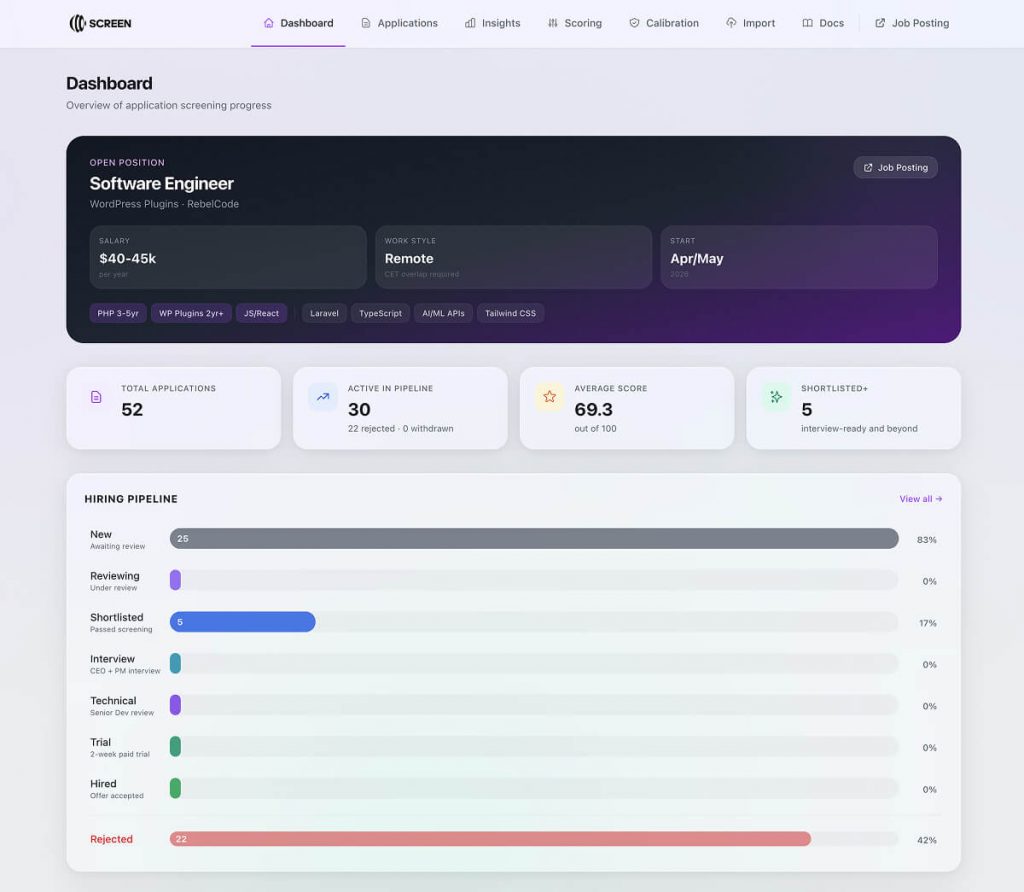
“Use this dashboard as a reference for spacing, card layout, navigation style, and typography. Keep the same calm visual hierarchy, but adapt the colors to our brand.”
This works because references reduce interpretation.
A screenshot can communicate layout density, spacing, visual weight, border radius, shadow depth, color mood, and interaction style far more efficiently than a long paragraph.
For WordPress work, references can include:
- Competitor websites.
- SaaS dashboards.
- Landing pages.
- Plugin interfaces.
- Ecommerce product pages.
- Pricing tables.
- Checkout flows.
- Mobile navigation examples.
- Existing brand assets.
- Past designs the client liked or disliked.
A reference does not mean copying. It means anchoring the discussion.
Clients often struggle to describe what they want. They may not know the language of design, UX, SEO, or development. A visual reference gives everyone a shared starting point.
AI benefits from that same clarity.
Define the Box Before Asking for the Output
Another useful habit is to define the boundaries before asking for execution.
Many poor briefs fail because they jump straight to output.
“Build a website.”
“Write the homepage.”
“Design the dashboard.”
“Create a plugin interface.”
Those are not briefs. They are requests.
A better brief defines the box first.
For example:
“This is a dashboard for a WordPress plugin company. The user is a support manager reviewing customer issues. The dashboard should help them identify urgent tickets, common bug reports, and customers at risk of churn. The interface should include a summary section, filters, a ticket table, priority labels, and a detail panel. Avoid bright colors and playful illustrations. The design should feel focused, calm, and operational.”
Now the work has direction.
The person or AI receiving the instruction knows what matters and what does not.
The box does not limit creativity. It prevents wasted creativity.
A team can still explore solutions, but those solutions now serve a defined purpose.
A Practical Brief Template for AI and Human Teams
Here is a simple structure that works for AI prompts, designer briefs, developer tasks, and client project scopes.
1. Objective
Explain what the work is supposed to achieve.
Example:
“Create a landing page that persuades WooCommerce store owners to book a demo for our inventory-sync plugin.”
2. Audience
Define who the work is for.
Example:
“The audience is small-to-medium WooCommerce store owners who already sell across multiple channels and are frustrated by manual stock updates.”
3. Context
Explain what the person or AI needs to know before starting.
Example:
“The product connects WooCommerce with Amazon, eBay, and Shopify. The main benefit is preventing overselling and reducing manual admin work.”
4. Required Output
State exactly what should be created.
Example:
“Create a homepage hero section, three benefit sections, a feature comparison table, a testimonial block, and a final CTA section.”
5. Constraints
Clarify boundaries.
Example:
“Do not use exaggerated claims. Do not promise instant setup. Keep the tone practical and trustworthy. Avoid generic AI-style marketing language.”
6. References
Provide examples.
Example:
“Use the structure of this SaaS landing page for section flow. Use this plugin website for tone. Use this dashboard screenshot for visual direction.”
7. Success Criteria
Explain how the work will be judged.
Example:
“The page should make it clear who the product is for, what problem it solves, how it works, and why the visitor should book a demo.”
This structure may look simple, but most weak prompts fail because they skip several of these elements.
The Middle Layer Is Becoming More Valuable
AI is improving at both ends of the work process.
At one end, it can summarize research, compare competitors, generate concepts, and analyze information.
At the other end, it can produce code, copy, layouts, tables, and structured outputs.
The most valuable work increasingly sits in the middle.
That middle layer includes:
- Translating business goals into technical requirements.
- Turning vague client requests into clear scopes.
- Identifying hidden complexity.
- Deciding which features should not be built.
- Prioritizing work.
- Reviewing AI output.
- Connecting strategy with execution.
- Protecting clients from bad assumptions.
- Asking better questions before production starts.
This is where strong WordPress professionals can separate themselves from cheap execution tools.
The client does not only need someone who can build a form.
They need someone who can ask whether the form should exist, what information it should collect, where that data should go, how it affects conversion, whether it creates privacy concerns, and how it fits into the rest of the customer journey.
AI can help with all of that, but it does not automatically take responsibility for the decision.
A professional does.
Prompting Is Becoming a Management Skill
The phrase “prompt engineering” often makes people imagine technical tricks.
In practice, the most valuable prompting skills look much more like management skills.
Good prompting requires the ability to:
- Break a large problem into smaller pieces.
- Communicate expectations clearly.
- Provide context.
- Set constraints.
- Give examples.
- Review output critically.
- Iterate without losing direction.
- Notice when the original request was wrong.
Those are the same skills needed to manage designers, developers, writers, marketers, and client projects.
This is why AI practice can improve real-world leadership.
Someone who learns to brief AI well may also become better at assigning tasks to a team. They become more aware of ambiguity. They notice missing context sooner. They stop assuming that other people can read their mind.
That is a major advantage.
Many project failures do not happen because people lack talent. They happen because the work was never clearly defined.
AI makes that failure visible.
What WordPress Teams Should Practice Now
WordPress teams can use AI as a training ground for better project communication.
Here are practical habits worth building.
Create Reference Libraries
Save examples of layouts, dashboards, plugin interfaces, pricing pages, checkout flows, onboarding screens, and content structures.
Use these references when briefing AI or humans.
A shared reference library helps the whole team develop better taste and a common design language.
Write Briefs Before Prompts
Before asking AI to produce anything, write a short project brief.
Even a five-minute brief can dramatically improve output.
This forces you to define the goal, audience, constraints, and expected result before generating work.
Compare Vague and Specific Prompts
Use the same task twice.
First, prompt AI vaguely. Then prompt it with references, constraints, and a clear structure.
Compare the outputs.
This simple exercise makes the value of specificity obvious to everyone on the team.
Review Outputs Like a Manager
Do not accept AI output just because it looks finished.
Ask:
- Does it solve the actual problem?
- Is it aligned with the audience?
- Is it accurate?
- Is it maintainable?
- Is it accessible?
- Does it create future complexity?
- Does it support the business goal?
This is the same review process you should apply to human work.
Turn Good Prompts Into Reusable Briefs
When a prompt produces a strong result, save it.
Over time, you can build prompt templates for:
- Landing pages.
- Plugin interface design.
- WooCommerce product pages.
- SEO briefs.
- Content outlines.
- Support documentation.
- Onboarding flows.
- Feature specifications.
- Internal tools.
These templates become operational assets.
They reduce inconsistency and help less experienced team members produce better first drafts.
The Skill Gap WordPress Education Often Misses
Most WordPress education focuses on how to build.
That makes sense. People need to learn themes, plugins, hosting, blocks, WooCommerce, SEO, performance, and security.
But the next skill gap is not only technical.
It is judgment.
More professionals need to learn:
- When to build.
- What to build.
- What not to build.
- How to define scope.
- How to challenge weak client requests.
- How to translate goals into requirements.
- How to create briefs that reduce confusion.
- How to evaluate output before shipping it.
AI makes this gap more visible because it reduces the cost of production.
When production becomes easier, decision quality matters more.
A weak strategy executed quickly is still weak.
A bad feature built instantly is still a bad feature.
A vague brief answered by AI is still vague.
The professional advantage will belong to people who can combine AI speed with human judgment.
Final Thoughts
AI is not only changing how WordPress professionals build websites, plugins, content, and internal tools.
It is changing how they think about communication.
Every prompt is a small management exercise. Every output is a test of how clearly the instruction was framed. Every failed result is a chance to see where the brief was too vague.
The lesson is simple:
If you want better AI output, give better instructions.
If you want better team output, give better briefs.
If you want better client outcomes, define the problem before rushing toward the solution.
The same skill improves all three.
So the next time you are tempted to ask AI to “make it better,” stop.
Show an example.
Name the style.
Define the audience.
Set the constraints.
Explain the goal.
Describe what success looks like.
That is not just better prompting.
That is better management.